Thursday, August 25, 2022

wso2 api manager

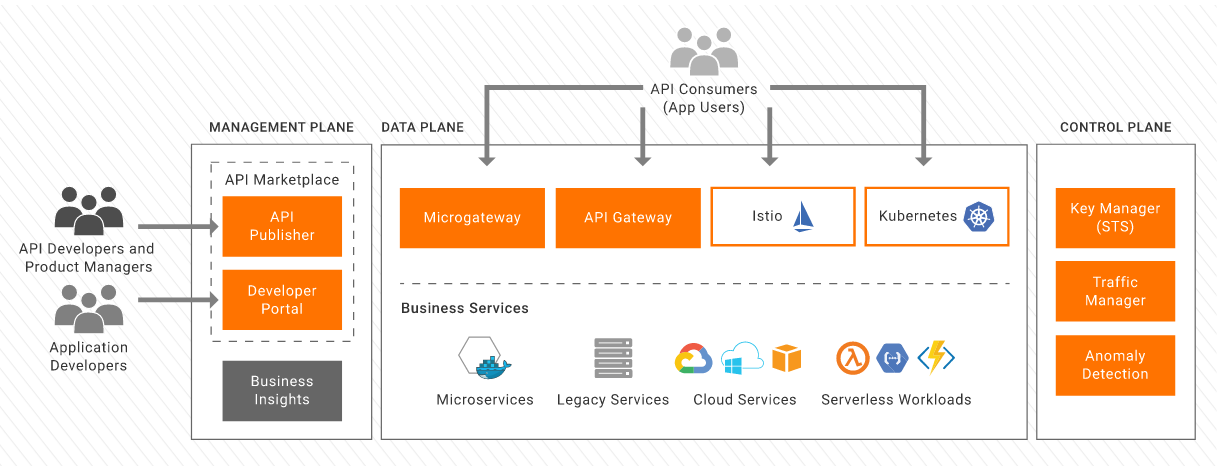
https://apim.docs.wso2.com/en/3.2.0/assets/img/get_started/basic-architecture.png

What is wso2?

WSO2 mainly have 3 tools

1. EI(Enterprise Integrator) - If integrating different application, third party application, like CRM+salesforce, databases etc.

2. API manager - for governing, maintaining and managing the lifecycle of api, its lets to design publish and manage the lifecycle of an api, help in secure api, auth mechanism, throttling policy, and also its secure api with rolled based access through scoops.

3. Identify server - manage the identify of user


WSO2 API manager -

install it from official website.

you need your official email id for download.

set JAVA_HOME path, and JDK is required for this package.

How to start wso2?

start by script that is in packag/bin folder......there will be file name api_manager.sh script

for window it would be api_manager.bat 


During installation might can get few errors:

Like port 5672 is not available  etc.

check with ps cmd, if any process running with this pid or restart the script, or try after restart your system.

 how to login in wso2 manage api?

you will get 2-3 url after wso2 start:

https://34.121.88.128:9443/publisher

https://34.121.88.128:9443/devportal

https://34.121.88.128:9443/carbon


for WSO2 api login on publisher url

default user/pass - admin

how to create api in wso2?

you can create a test api or you can create your own api then create it on wso2 with endpoint

you can use public api also for testing and create on wso2 api manage.

 How to Publish and Subscribe APIs

https://www.youtube.com/watch?v=-TicJqTjq2M&t=924s


WSO2 CI/CD with Jenkins

https://www.youtube.com/watch?v=Hr9dYk2J7e0

https://www.youtube.com/watch?v=Uz5Rf_ZjGms


https://www.youtube.com/watch?v=rmf4SH7Sod0


Tuesday, August 16, 2022

Gitlab CI/CD with Kubernetes

 Gitlab CI/CD with Kubernetes

git lab is like github, we can store our code in gitlab, but its have more function apart from that:-
1. we can do CI/CD, we can do automation and we can create pipeline.
2. we have option to integrate with multiple services (like kubernetes, monitoring etc)
3. we have repository storage, for container image etc.


Gitlab agent
The GitLab Agent for Kubernetes ( agentk ) is an active in-cluster component for solving GitLab and Kubernetes integration tasks in a secure and cloud-native way. The agentk communicates to the GitLab Agent Server (KAS) to perform GitOps operations.

GitLab runner
GitLab Runner is an application that works with GitLab CI/CD to run jobs in a pipeline. You can choose to install the GitLab Runner application on infrastructure that you own or manage.

how to work in gitlab for CI/CD?
1. way to create one project and we use agent for connect to the cluster, and use runner for run CI/CD jobs in the pipeline.
2. create 2 project, 1st project connect with cluster, and use it for run yaml, manifest file, that you will building image in 2nd project.......and in second project you build code, using runner, you will run CI/CD pipeline.

3. Only CD job, you build on local and you upload image in gitlab repository, and with the help of gitlab agent, you will deploy on kubernetes cluster.

4. Only create 1 project, and using gitlab runner, you run kubernetes cluster cmd also to deploy on kubernetes cluster.

1. way
below project for ci/cd jobs we using .gitlab-ci.yaml file for config:
https://gitlab.com/manjeetyadav19/docker_test
and for agent go to Infrastructure - Kubernetes cluster - connect a cluster - in drop down - select the name of agent that you have mentioned in .gitlab/agent/nagyu-local.......and the configuration for the agent you have config file - .gitlab/agent/nagyu-local/config.yaml

2. way
create 2 project
1st for agent - https://gitlab.com/manjeetyadav19/docker-agent
2nd for ci/cd of app with the help of runner - https://gitlab.com/manjeetyadav19/docker-app

3. way
create 1 project only for CD,  with the help of gitlab agent deploy on kubernetes cluster:-
https://gitlab.com/manjeetyadav19/docker-agent

4. way
create 1 project only 1st do CD work with the help of runner, and then do some configuration on your kubernetes cluster server and then mention kubernetes deployment cmd in .gitlab-ci.yaml  to do deployment on kubernetes cluster.
https://gitlab.com/manjeetyadav19/docker-solo


how to install gitlab runner on your machine/cluster?
install binary or package
for register below is the cmd:
#sudo gitlab-runner register

if runner unable to connect not in create state what you do?
#sudo gitlab-runner verify   # user verify cmd to check if runner connected or not?
#$ gitlab-runner verify --delete -t Token-From-Your-Runner -u https://gitlab.com/  
also you can remove runner from below config file
/etc/gitlab-runner/config.toml